SAM TTS:免费在线文本转语音工具,复刻经典Microsoft SAM声音

作者:

在


简介介绍

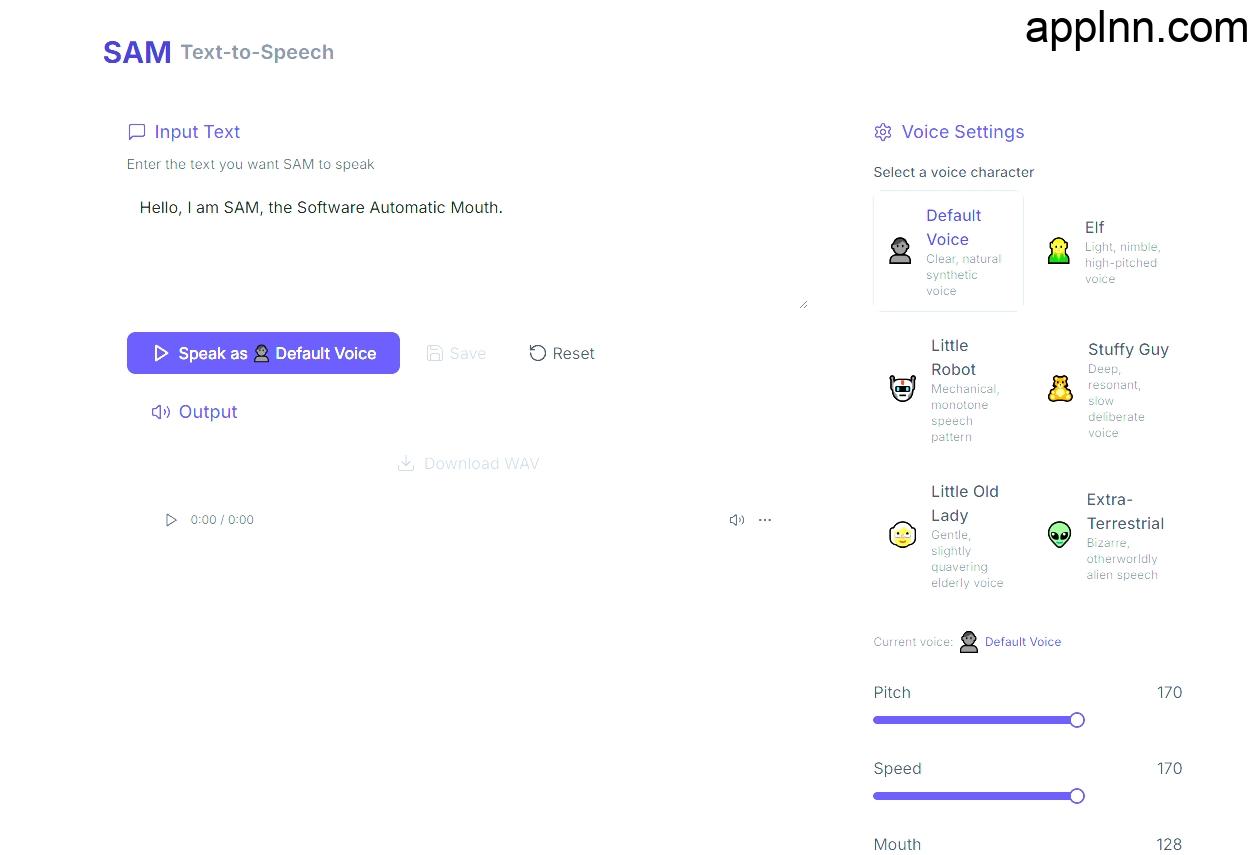
SAM TTS是一款便捷的在线文本转语音(TTS)工具,它能够在浏览器中直接使用,无需任何注册或安装过程。

这款工具特别之处在于它完整复刻了Windows XP时代的Microsoft SAM合成声音,为用户提供了一种标志性的电子合成语音体验。

只需打开网页,输入文字,即可立即听到由SAM TTS生成的语音。

无论是想要重温Windows XP时代的声音,还是需要一个简单的文本转语音解决方案,SAM TTS都是一个不错的选择。立即访问SAM TTS,体验经典电子合成语音的魅力。

功能亮点

即开即用

打开浏览器便可体验,无需任何形式的账号登录或软件安装;所有功能完全免费,无次数限制。

高品质音频导出

支持一键下载为无损WAV格式,音质清晰可用于视频配音、游戏开发和创意项目等多种场景。

广泛兼容性

在Chrome、Safari、Firefox等主流浏览器上均能稳定运行,手机、平板和桌面环境均可访问。

工具地址

官网地址:https://samtts.com/

评论

15 条对“SAM TTS:免费在线文本转语音工具,复刻经典Microsoft SAM声音”的回复

  1. voxel game 的头像

    Really helpful post. The space around voxel game is evolving quickly, and posts like this keep people informed. I like how accessible it is to just open a browser and start building.

  2. ImageSplit 的头像

    SAM TTS 是声音工具,页面上的波形截图更适合切成格子。我用 ImageSplit 在浏览器里切,不上传。经典 Microsoft SAM 一格一格更好对比。

  3. Nora Ellison 的头像

    在线工具如果还要上传原图就不成立。我在浏览器里把图切成编号格子再导出。

  4. leony 的头像

    On the clip, the stills survive and the video does not. Low-light and already-compressed social video are where detail disappears first. I keep the original MP4 and rebuild it to 1080p so faces and type stay stable.

  5. AI Cartoon Generator 的头像

    这个免注册、打开浏览器就能用的思路确实是创意工具的趋势。SAM TTS 把 Windows XP 的经典合成音完整复刻出来,怀旧之外也有实用价值——一键导出无损 WAV,拿去做短视频配音或小游戏音效都很方便,很多同类在线工具反而在导出格式上处处设限。我们也在做一款浏览器直用的 AI 卡通生成器,同样走不注册不安装的轻量路线,对这种”打开即用”的体验深有同感。希望站长多发掘这类开箱即用的小工具。

  6. Alex Rivera 的头像

    Tool roundups skip the last-mile job: a finished screenshot whose words are wrong. I replace the visible text instead of rebuilding the graphic.

  7. ride a pet wiki 的头像

    The ability to recreate classic synthesized voices directly within a browser is an interesting development for accessibility and creative projects. Having an easy, registration-free tool for generating this specific type of audio output provides a convenient option for users seeking a nostalgic or distinct synthetic tone.

  8. migosai 的头像

    The recreation of the Windows XP-era Microsoft SAM voice is a particularly compelling feature, since that synthetic sound is instantly recognizable and nostalgic. I also appreciate that the tool works directly in a browser, keeping the process accessible for quick experiments. I wonder whether future versions might offer controls for pitch, speed, or pronunciation.

  9. leony 的头像

    SAM TTS turning text into speech is the audio half of a clip, not the picture. Announced kling 4.0 is about 30 seconds with more keyframes and multimodal references, and 4.0 Flash is official early access at about 20 seconds and 720p. Soutine’s generator remains Kling 3.0, including optional audio, roughly 3-15 seconds, start and end frames, 720p/1080p/4K. There is no access date.

  10. Hotel Lobby AI 的头像

    SAM TTS 复刻的经典合成音很适合做短视频旁白实验。我们做的 Hotel Lobby AI 生成视频不包含原曲;如果想给成片加声音,可以另行制作旁白,并在发布前确认音乐或音效的使用许可。文中提到的浏览器直接试听和 WAV 导出,对这种后期流程很实用。

  11. Nano Banana 2.1 的头像

    怀旧的电子合成音确实承载了不少时代记忆,能够在线快速复刻这种声音对于音频创作或演示来说非常实用。

  12. MindLM 的头像

    「完整复刻了Windows XP时代的Microsoft SAM合成声音」这一点挺有意思,很多人对那个声音的印象就是机械但很好认。想问一下,它对中文文本的支持怎么样,还是只适合英文?如果能读中文,拿来给 MindLM 生成的思维导图大纲配一段复古语音讲解,应该会挺好玩。另外,导出的音频格式有哪些可以选?

  13. Everygen 的头像

    感谢分享,SAM 的声音真是满满的 Windows XP 回忆。无需注册、可以直接导出无损 WAV 这一点很实用,用来给视频配复古风格的旁白或者做游戏音效都很合适。

  14. AI Genjutsu 的头像

    The preservation of classic synthetic voices offers an interesting look back at early computing history and accessibility tools.

  15. lucas 的头像

    复刻 Microsoft SAM 的经典电子音色很有意思,而且无需注册、能直接导出 WAV,对视频配音和游戏原型都很实用。浏览器端即开即用这一点介绍得很清楚。

发表回复

您的邮箱地址不会被公开。 必填项已用 * 标注